 Datum
Small, quick, light on memory.
包小、启动快、占用少。
Datum draws its UI with each platform's native views, not an embedded browser, and the result grid only creates views for the cells you can see.
Datum 用各平台原生视图绘制界面,不内嵌浏览器;结果表只为看得见的单元格创建视图,滚动时复用。
| metrictext | valuemeasured | |||
|---|---|---|---|---|
| 1 | Download | 安装包 | 33 MB | Mac, Apple silicon. The Windows installer is about 22 MB.Mac(Apple 芯片)。Windows 安装器约 22 MB。 |
| 2 | Launch | 启动 | 0.2 s | From opening the app to the window on screen.从打开应用到窗口出现。 |
| 3 | Idle memory | 空闲内存 | 31 MB | As shown in Activity Monitor.「活动监视器」里的数字。 |
| 4 | 100,000 rows | 10 万行 | 0.3 s | A query returning 100,000 rows × 10 columns, from running it to rows in the grid.查询返回 10 万行 × 10 列,从执行到显示在表格里。 |
Apple M4, 24 GB, macOS 27.2, release build, local SQLite. Table browsing pages on the server, so a 1,000,000-row table shows its first page in about 0.1 s. See also nsh's performance report.
Apple M4、24 GB 内存、macOS 27.2,release 构建,本地 SQLite。表浏览走服务端分页,100 万行的表首屏约 0.1 秒。另见 nsh 的性能报告。
Write SQL the way you think.
按你的思路写 SQL。
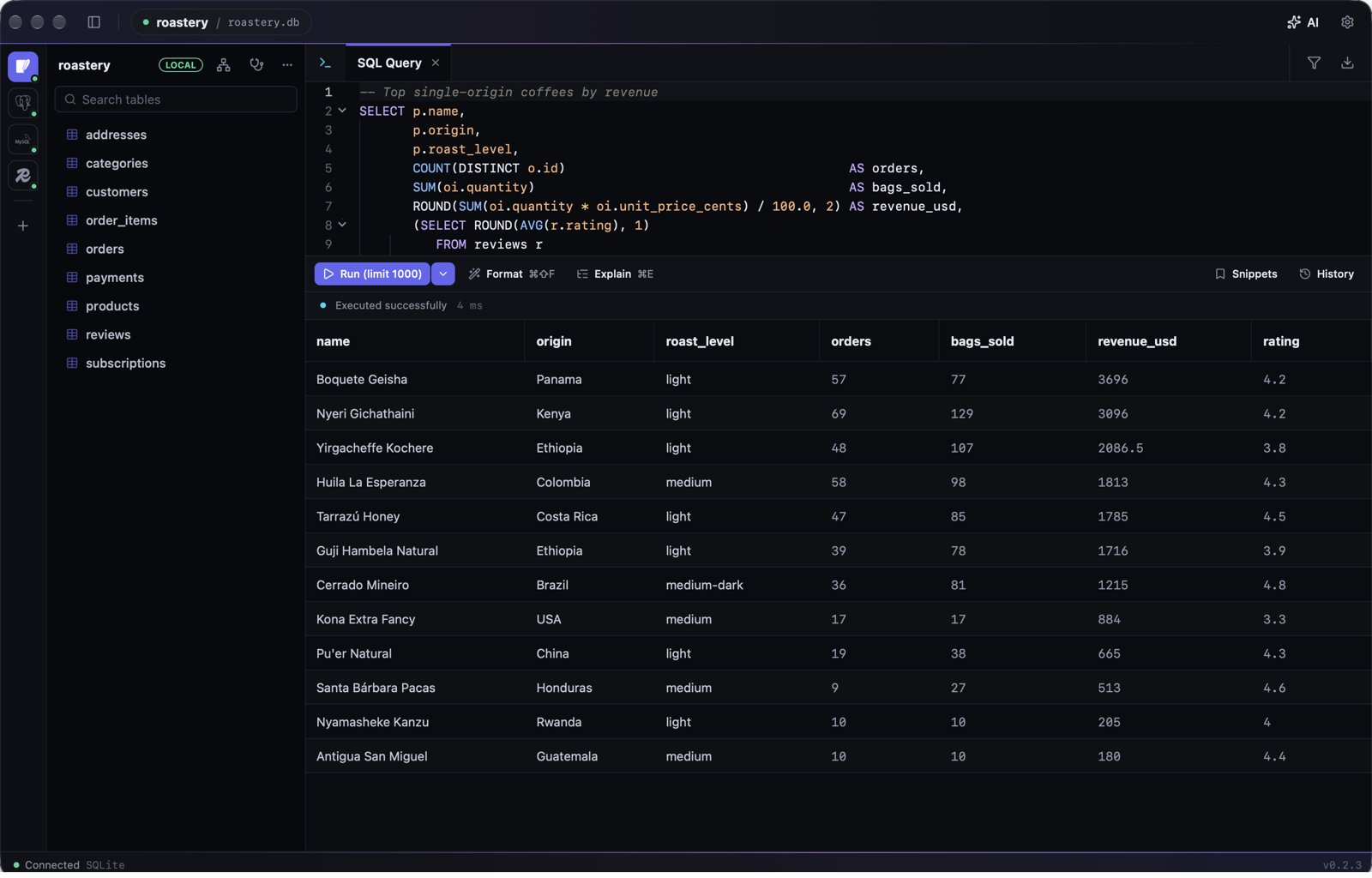
Completion knows your tables, aliases and columns, writes the ON clause from foreign keys, and offers the real values of a status column after =. Run the statement under the cursor with ⌘↵, or everything with ⌘⇧↵ and get one result tab per statement.
补全认识你的表、别名和列,按外键写好 ON 条件,在 = 后面给出状态列里实际存在的取值。⌘↵ 执行光标所在语句,⌘⇧↵ 执行全部,每条语句一个结果标签。
Errors can go straight to AI for a fix, and Explain plans come back with a plain-language reading.
报错可以直接交给 AI 修,Explain 的执行计划也能让 AI 讲给你听。
Edit rows, then commit once.
先改,再一次提交。
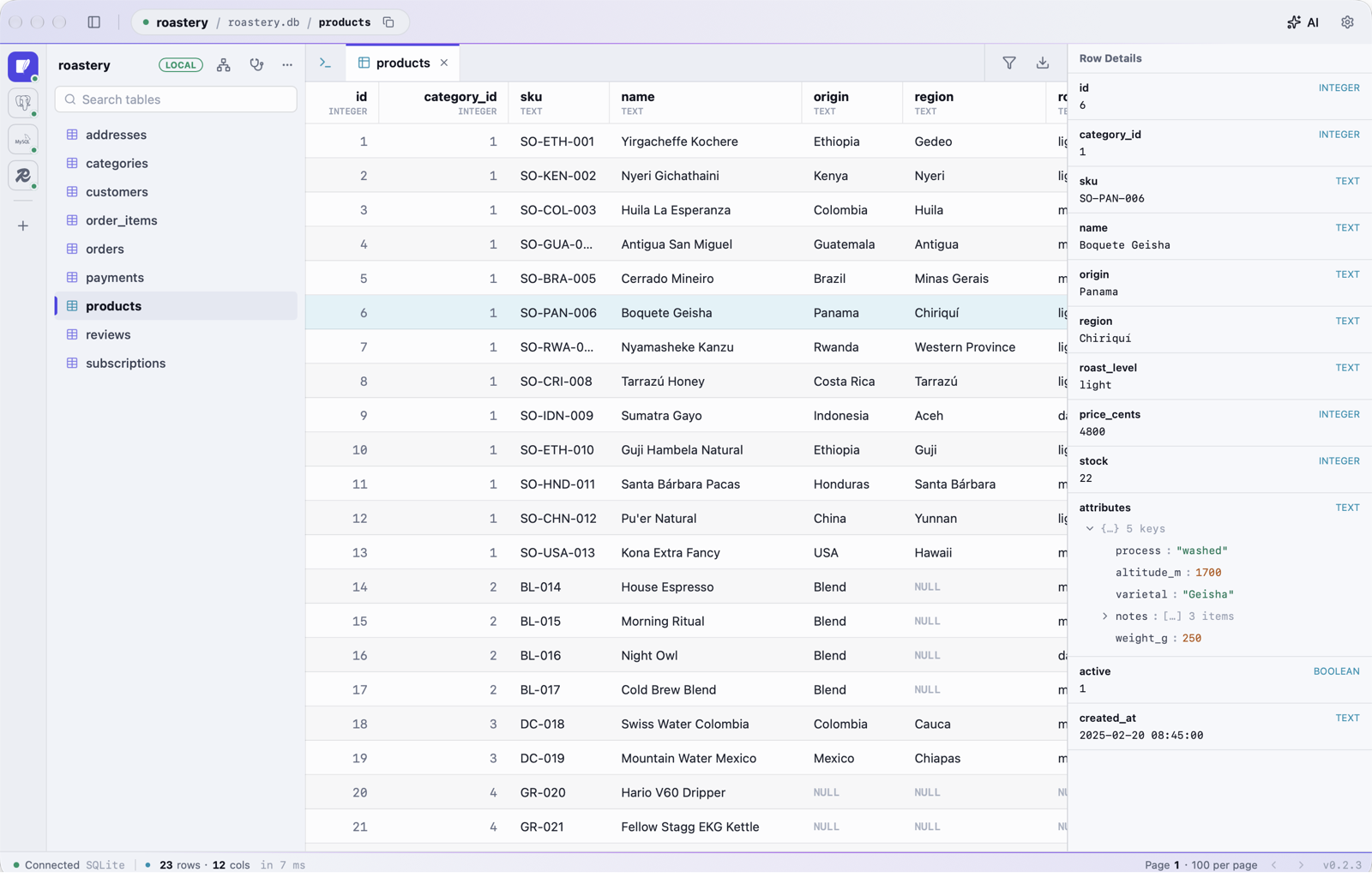
Change cells and delete rows in the grid. Nothing touches the database until ⌘S, and then it all goes in one transaction.
直接在表格里改单元格、删行。按 ⌘S 之前不动数据库,提交时所有改动在同一个事务里。
Filter by typing a sentence: "last 7 days, status failed, amount over 100" becomes AND / OR conditions you can still edit.
筛选可以直接说一句话:「最近 7 天、状态失败、金额大于 100」会变成可以继续修改的且 / 或条件。
Ask, and it looks for itself.
问一句,它自己去查。
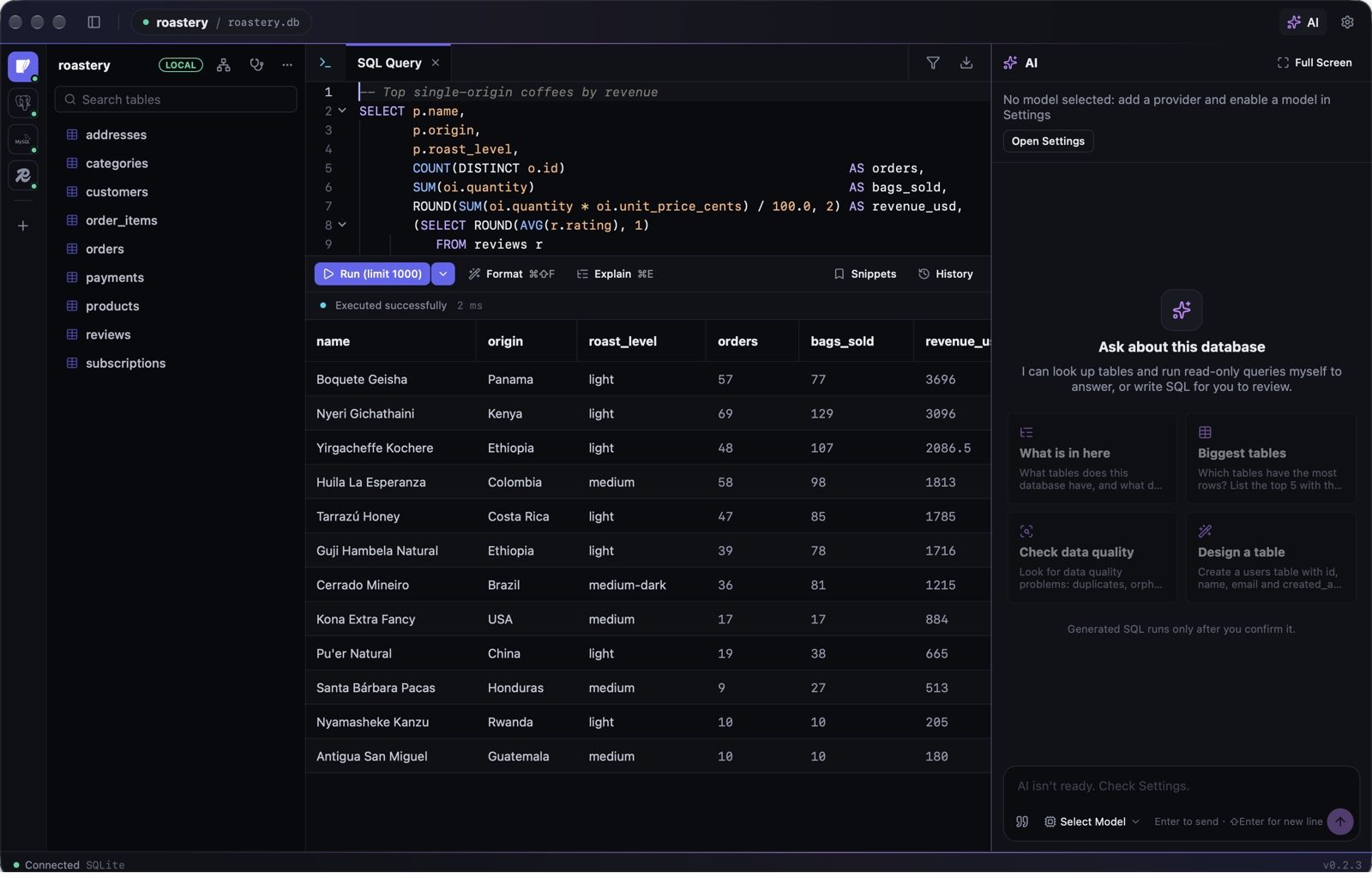
AI reads the schema of the current connection and runs read-only queries to answer you. Anything that writes comes back as a SQL card for you to confirm.
AI 会自己查看当前连接的表结构、执行只读查询来回答你。凡是要写入的,都以 SQL 卡片交给你确认。
Bring your own provider: OpenAI-compatible, Anthropic or Gemini, with presets for DeepSeek, Qwen, Kimi and more. Press ⌘J to give the conversation the whole window.
服务商自己配:OpenAI 兼容、Anthropic、Gemini,内置 DeepSeek、通义、Kimi 等预设。按 ⌘J 让对话占满整个窗口。
On prod connections it only sees table structure until you allow more, so customer data doesn't leave your machine by accident.
在 prod 连接上,AI 默认只能看表结构,你允许之后才读数据,客户数据不会被顺手发出去。
Hard to shoot yourself in the foot.
不容易误操作。
Every connection carries its environment's color. On prod, even an UPDATE or DELETE with a WHERE shows how many rows it will touch before it runs, and most writes can be undone afterwards.
每个连接都带着环境的颜色。在 prod 上,即使带 WHERE 的 UPDATE、DELETE 也会先告诉你要动多少行,大多数写操作事后还能撤销。
A runaway query can be stopped on the server, not just abandoned. Transactions you open in the editor stay yours: BEGIN … COMMIT spans statements, and previews and undo never end them for you.
跑飞的查询可以在服务器端真正停下,而不只是不等结果。编辑器里开的事务始终归你管:BEGIN … COMMIT 跨多条语句生效,影响预估与撤销都不会替你结束事务。
Try it: pick an environment and run the statement.
试试看:选一个环境,点运行。
Know what the server is doing.
看清服务器在忙什么。
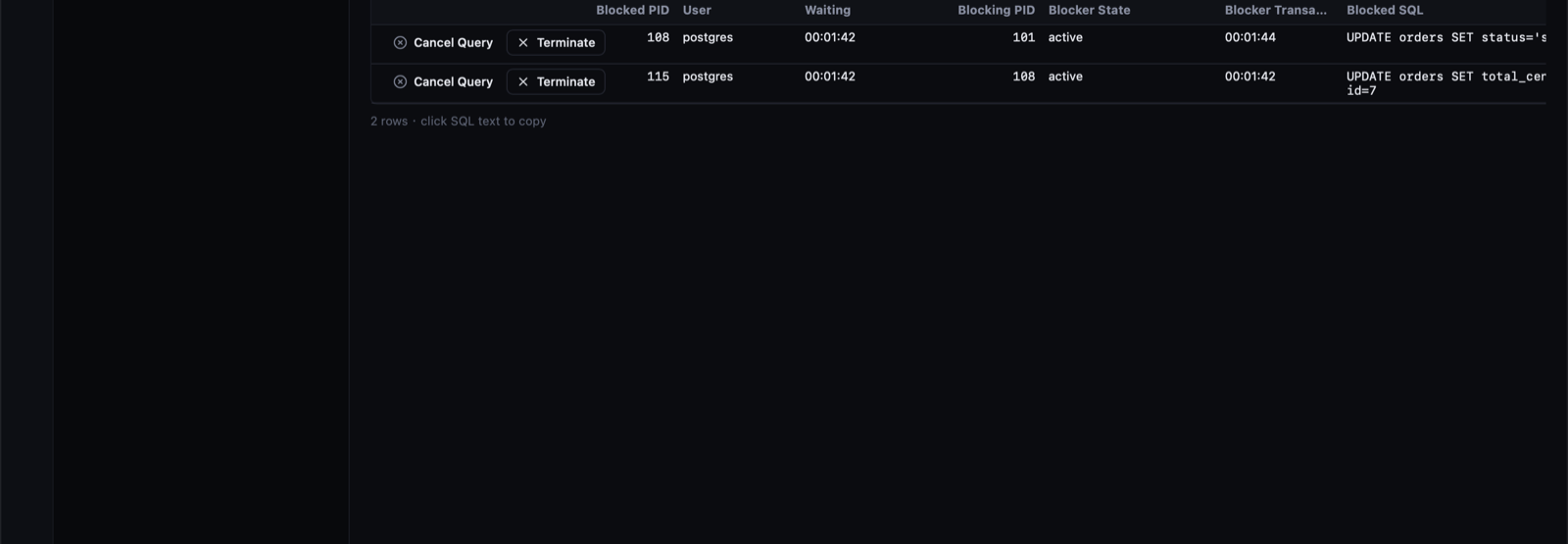
The diagnostics tab lists sessions, lock waits, long transactions, the slowest statements, unused indexes and dead rows, and lets you cancel or end a session after you confirm.
诊断标签页列出会话、锁等待、长事务、最慢的语句、没用上的索引和死行,确认后可以取消查询或终止会话。
Redis gets its own analysis: memory, the biggest keys, memory by prefix, TTL spread and the slow log, scanned in the background.
Redis 也有专门的分析:内存概况、最大的 key、按前缀统计的内存、TTL 分布和慢日志,在后台渐进扫描。
Prove an index helps before you build it.
建索引之前,
先证明它有用。
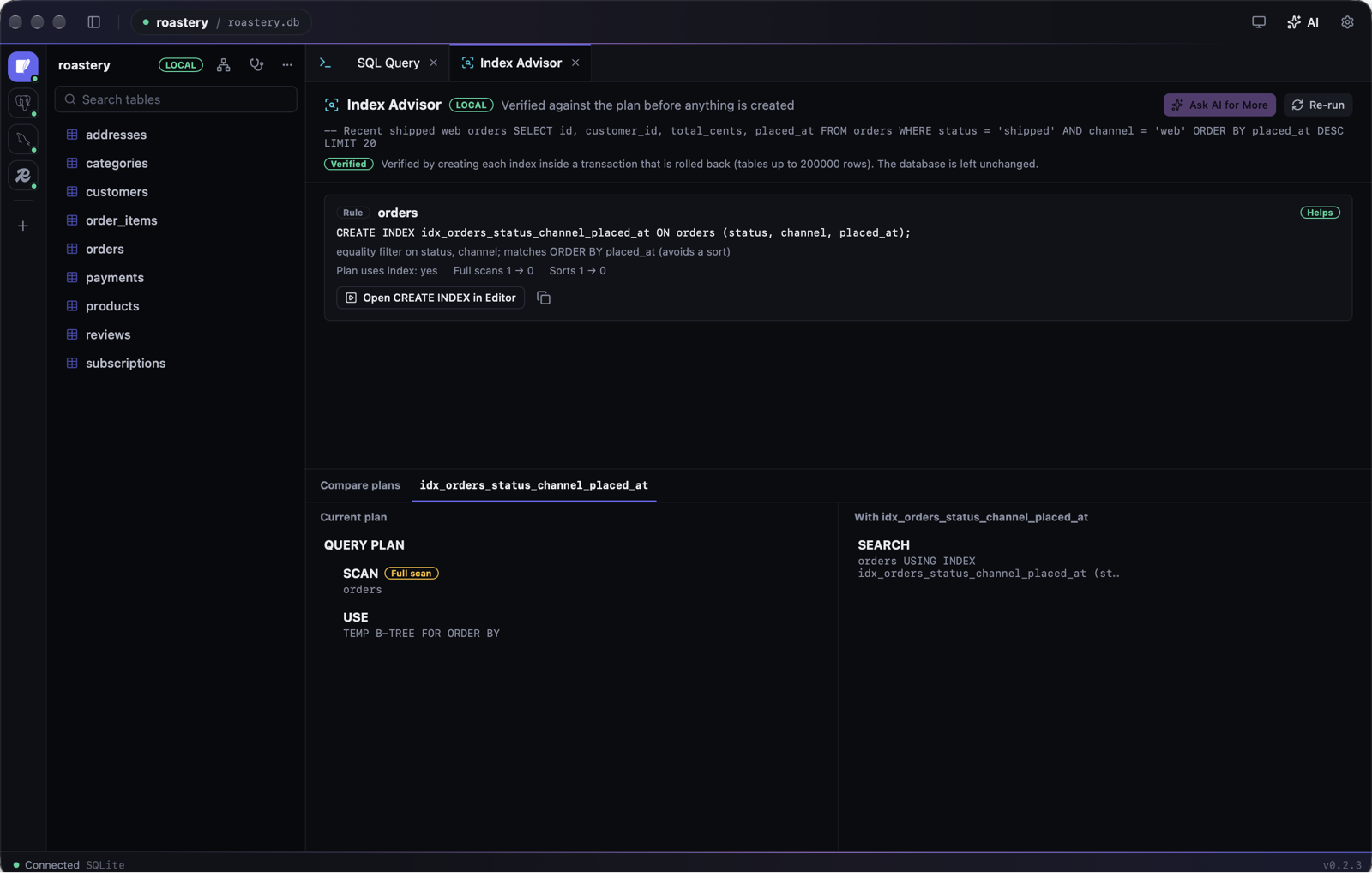
Point Datum at a slow query and it proposes indexes from the WHERE, JOIN and ORDER BY, then checks each one against the real plan: hypothetical indexes on PostgreSQL (hypopg), a rolled-back transaction on SQLite. You see the cost before and after, side by side.
把一条慢查询交给 Datum,它按 WHERE、JOIN、ORDER BY 提出候选索引,再拿真实的执行计划逐个验证:PostgreSQL 用 hypopg 假想索引,SQLite 在事务里建好再回滚。加索引前后的成本左右对照,一目了然。
Nothing is created until you open the CREATE INDEX in the editor and run it yourself. AI can add candidates too, and gets the schema and plan, never your rows.
你在编辑器里自己执行 CREATE INDEX 之前,库里什么都不会多。也可以让 AI 补充候选,它拿到的是表结构和执行计划,不是数据行。
Share your screen, not your customers.
分享屏幕,
不露客户数据。
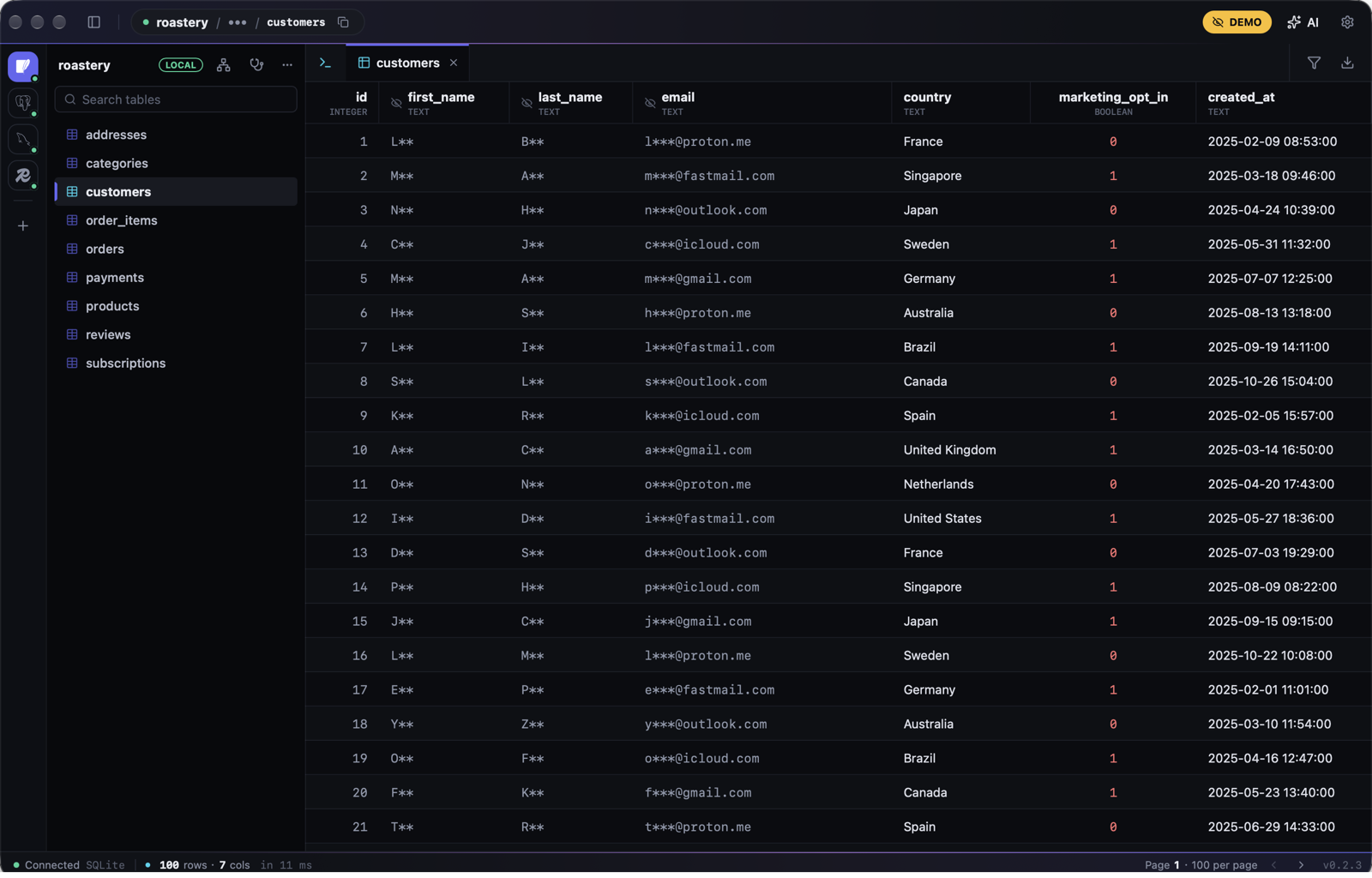
Datum spots sensitive columns, such as emails, phone numbers, ID and card numbers, passwords and tokens, by their names and their values, and masks them in the grid, in copies and exports, and in everything sent to AI. On by default for staging and prod.
Datum 按列名和取值认出敏感列:邮箱、手机号、证件号、银行卡号、密码与令牌,在表格、复制、导出和发给 AI 的内容里一律打码。staging 与 prod 连接默认开启。
Demo mode (⌘⇧D) masks every connection and hides hosts, user names and file paths, for screenshots, recordings and live demos.
演示模式(⌘⇧D)对所有连接强制打码,并隐藏主机、用户名和文件路径,截图、录屏、现场演示都放心。
Every write, on the record.
每一次写入,
都有据可查。
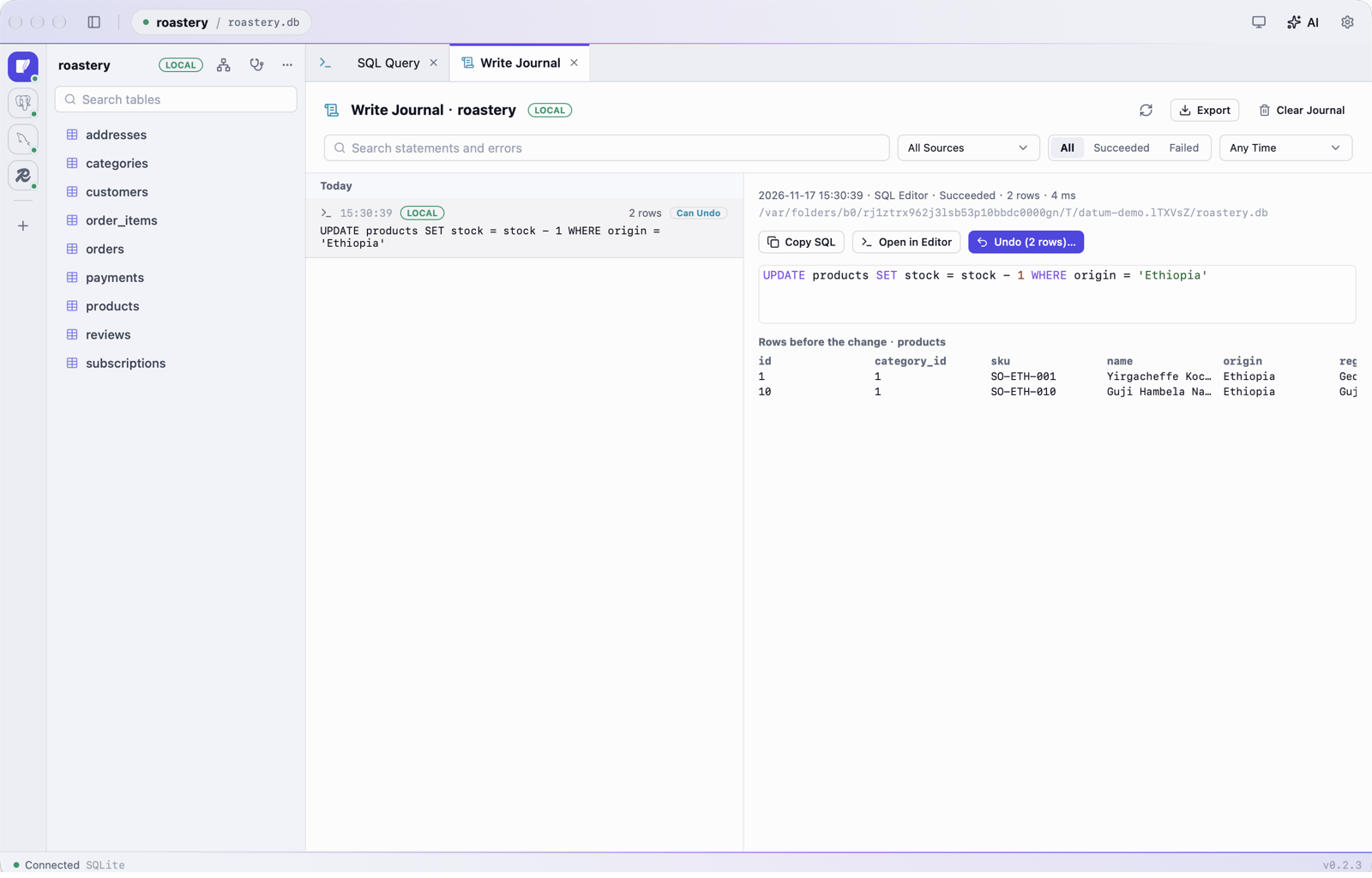
Writes from the editor, AI cards, grid edits, imports and Redis are kept in a local journal with the rows as they were before. Search it, export it as a change log, and undo an UPDATE or DELETE even after a restart; Datum first checks whether those rows have changed since.
编辑器、AI 卡片、表格编辑、导入和 Redis 的写操作都记进本机的写操作记录,连同改动前的行。可以搜索、导出成变更记录,重启之后照样能撤销 UPDATE、DELETE;撤销前 Datum 会先核对这些行后来有没有被改过。
The journal stays on your machine in a private file, is never sent to AI, and keeps 90 days by default.
记录只存在本机的私有文件里,从不发给 AI,默认保留 90 天。
Find what changed between two copies.
数据差在哪,
逐行找出来。
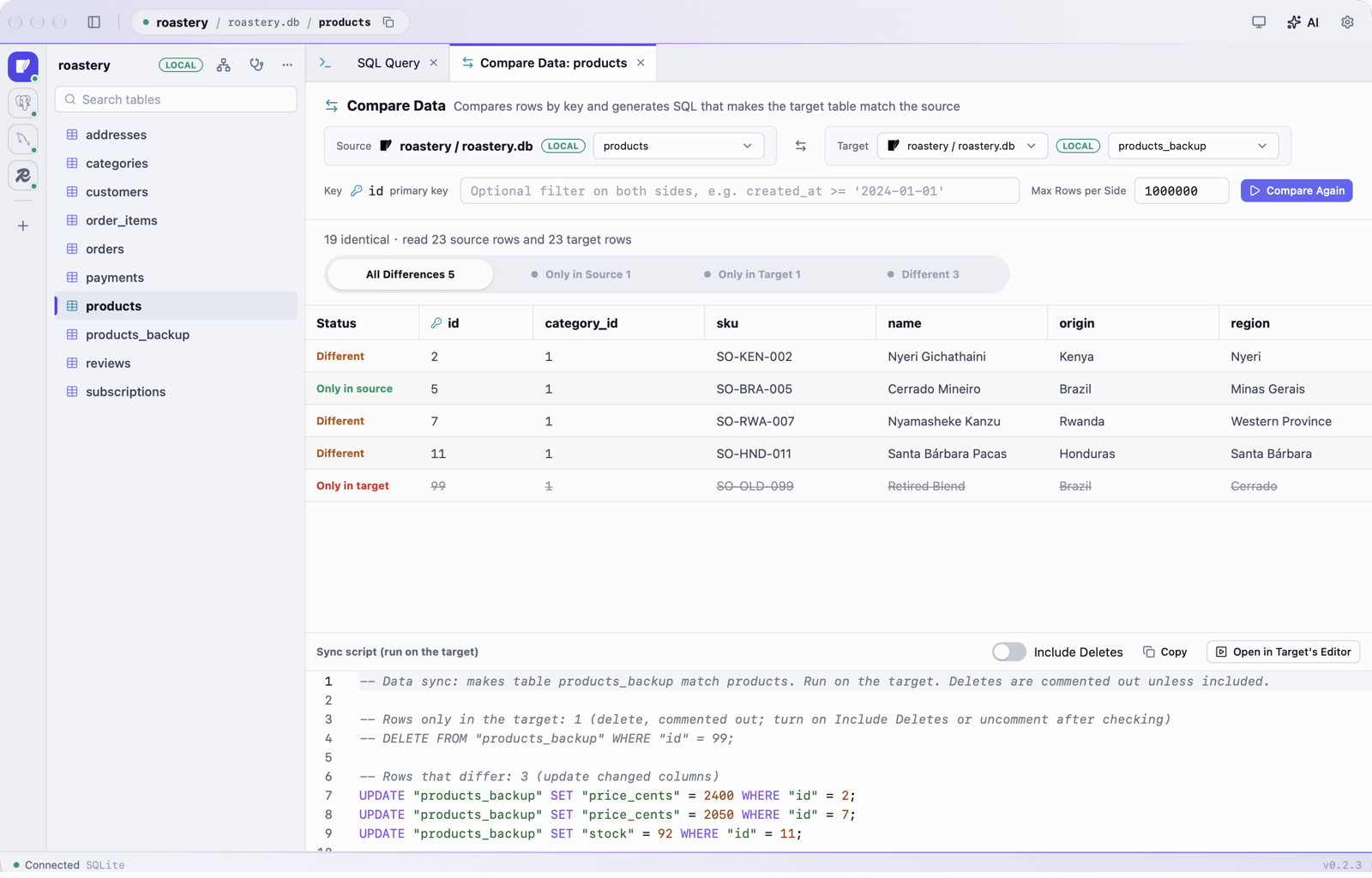
Compare a table across two databases, or with its backup, row by row by key: rows only on one side and cells that differ, highlighted. Datum then writes the INSERT, UPDATE and DELETE that bring the target in line.
按主键逐行比较两个库里的同一张表,或者一张表和它的备份:只在一边有的行、值不同的单元格都标出来。随后生成让目标与源一致的 INSERT、UPDATE、DELETE。
Big tables are read in chunks and can be stopped. Deletes start commented out, and the script runs in the target's editor with the usual review and undo.
大表分块读取,随时可停。删除语句默认注释掉,脚本在目标库的编辑器里执行,照常经过审查,也能撤销。
Test data that looks real.
像真的一样的
测试数据。
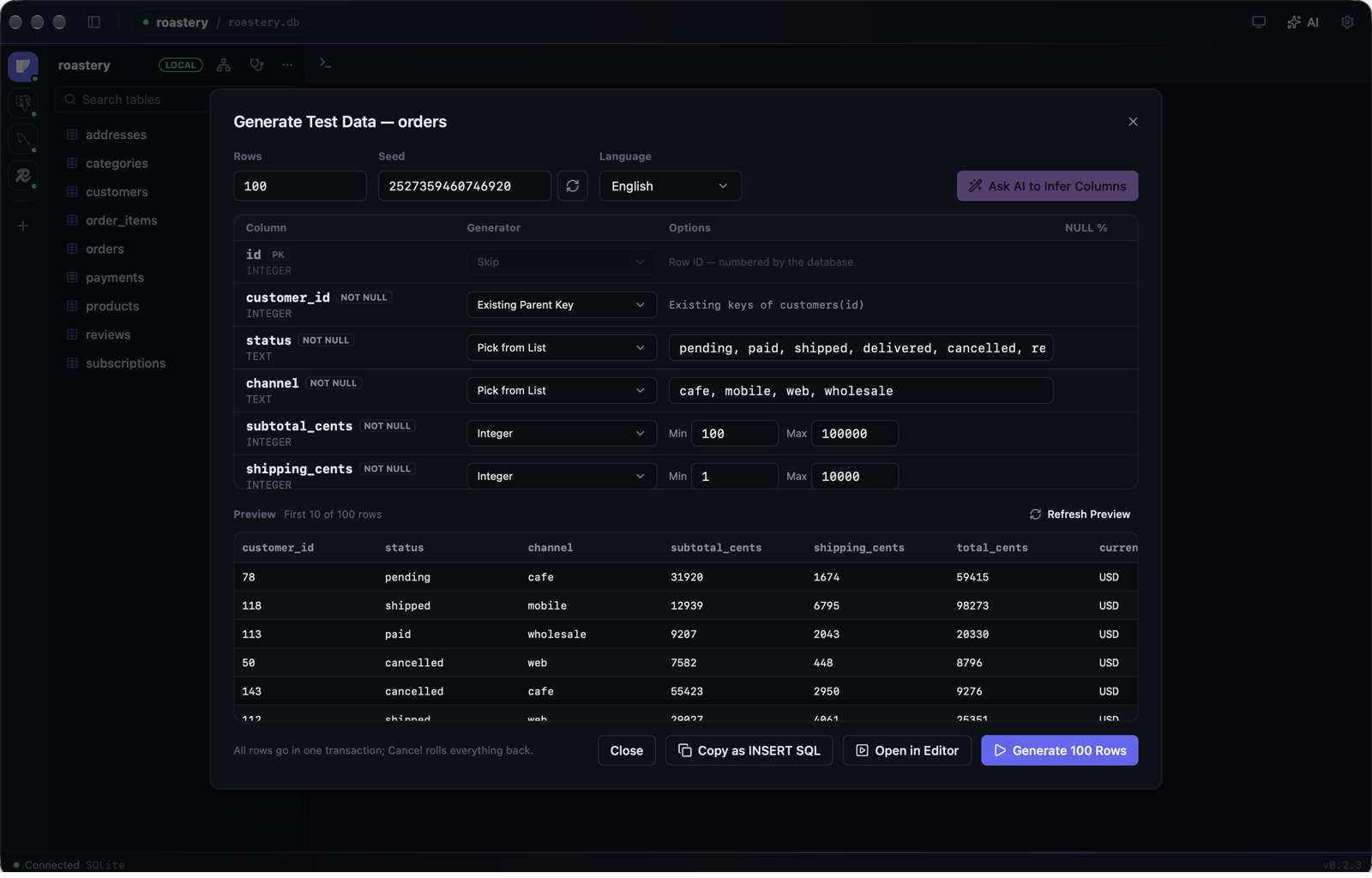
Right-click a table to fill it with believable rows, in English or Chinese. Datum picks a generator for each column from its name and type, and keeps to your constraints: unique values, foreign keys taken from parent tables, CHECK lists, lengths, and created_at before updated_at.
在表上右键,就能填进看起来真实的数据,中英文都行。Datum 按列名和类型为每列挑生成方式,并遵守你的约束:唯一值不重复、外键取自父表、符合 CHECK 清单与长度、created_at 早于 updated_at。
Preview the first rows, reuse a seed to get the same data again, and insert in a transaction you can cancel.
先预览前几行;同一个种子生成同样的数据;插入在事务里进行,可以随时取消。
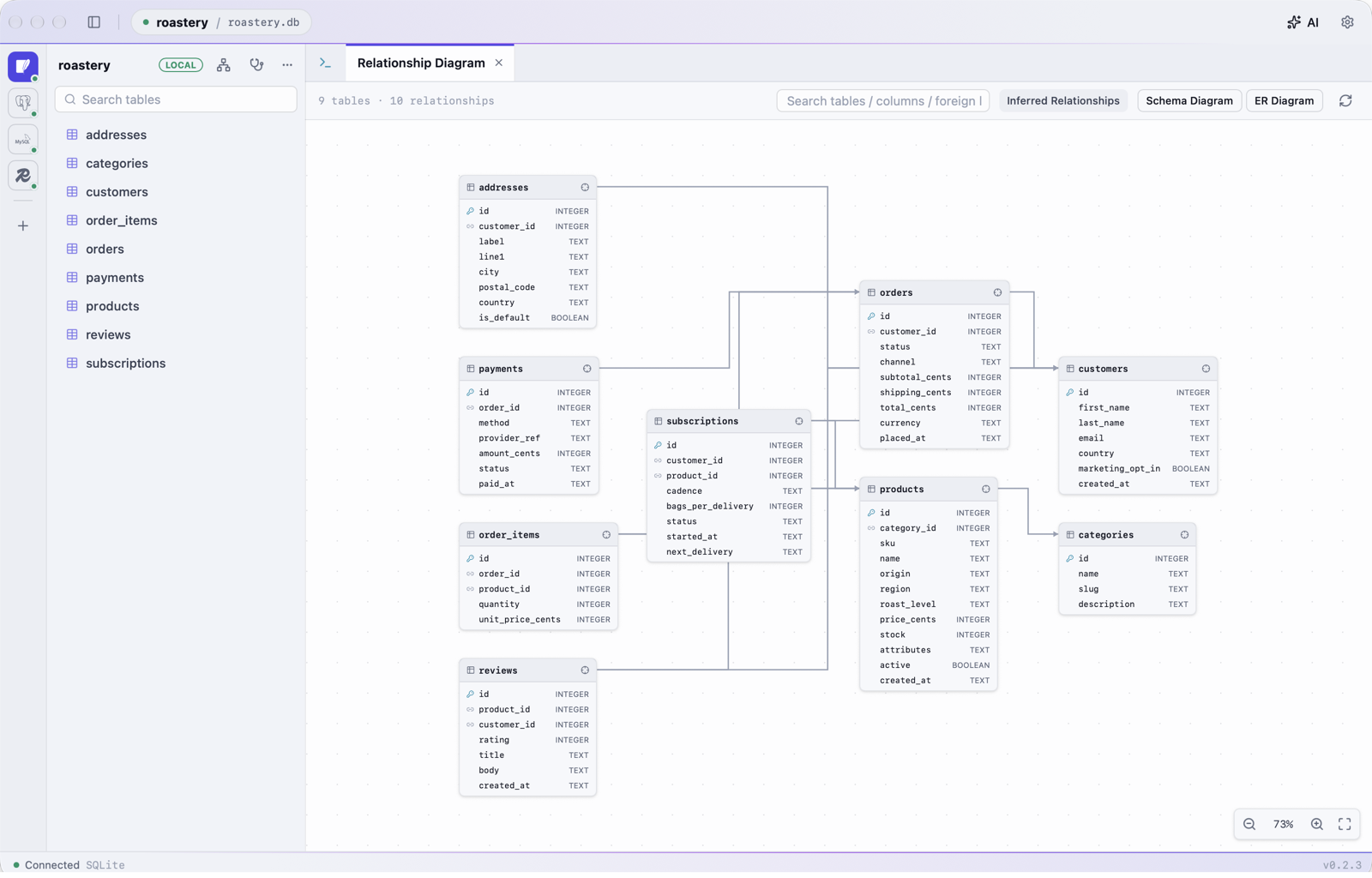
See how it all connects.
表之间怎么连,一眼看清。
The relationship diagram lays out every table and foreign key, including the ones a schema never declared but column names imply, like customer_id. Focus on one table to see just its neighbours, and double-click a table to open it.
关系图把所有表和外键排出来,连库里没声明、但列名一看就知道的关联(比如 customer_id)也会推断出来。聚焦某张表只看它和它的邻居,双击就能打开这张表。
Search tables, columns or keys, drag tables where you want them, and zoom with a pinch or ⌘ + scroll.
可以搜索表、列和外键,把表拖到顺手的位置,双指捏合或 ⌘ + 滚轮缩放。
Made for each database.
每种数据库,都有专门的功能。
Beyond a shared SQL editor, Datum handles the jobs that are specific to each engine, the ones a generic client leaves to the command line.
除了通用的 SQL 编辑器,Datum 还把每种数据库特有、通用客户端只能交给命令行的事做进了界面里。
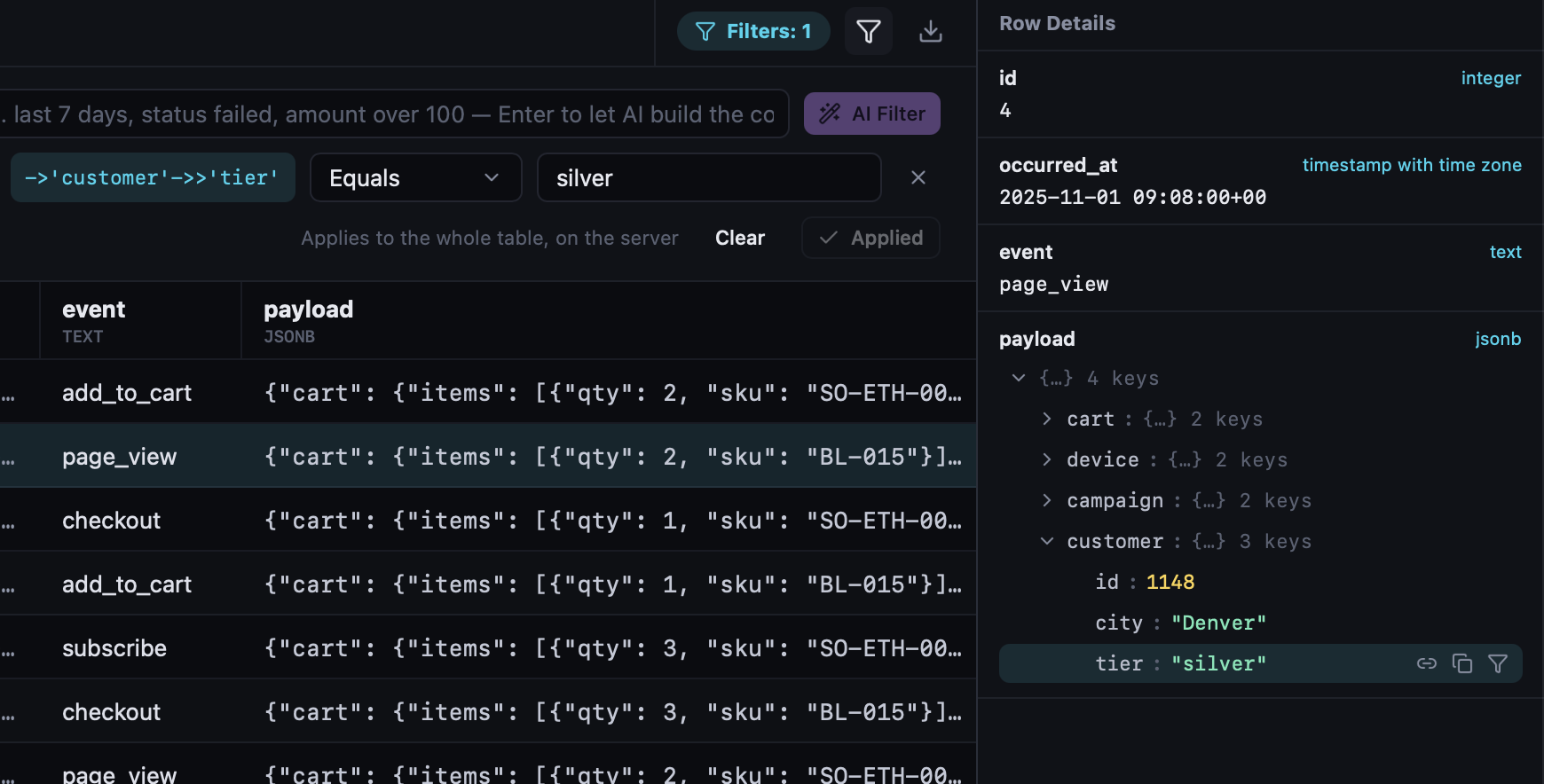
PostgreSQLJSONB you can click through能点开的 JSONB
JSONB cells open as a tree. Click a field to filter the whole table on it, and the editor suggests keys after ->', level by level. Explain plans are drawn as a tree with the costliest step marked.
JSONB 单元格展开成树,点一个字段就能按它筛选整张表;编辑器在 ->' 之后逐级提示键名。执行计划画成树,标出最耗时的一步。
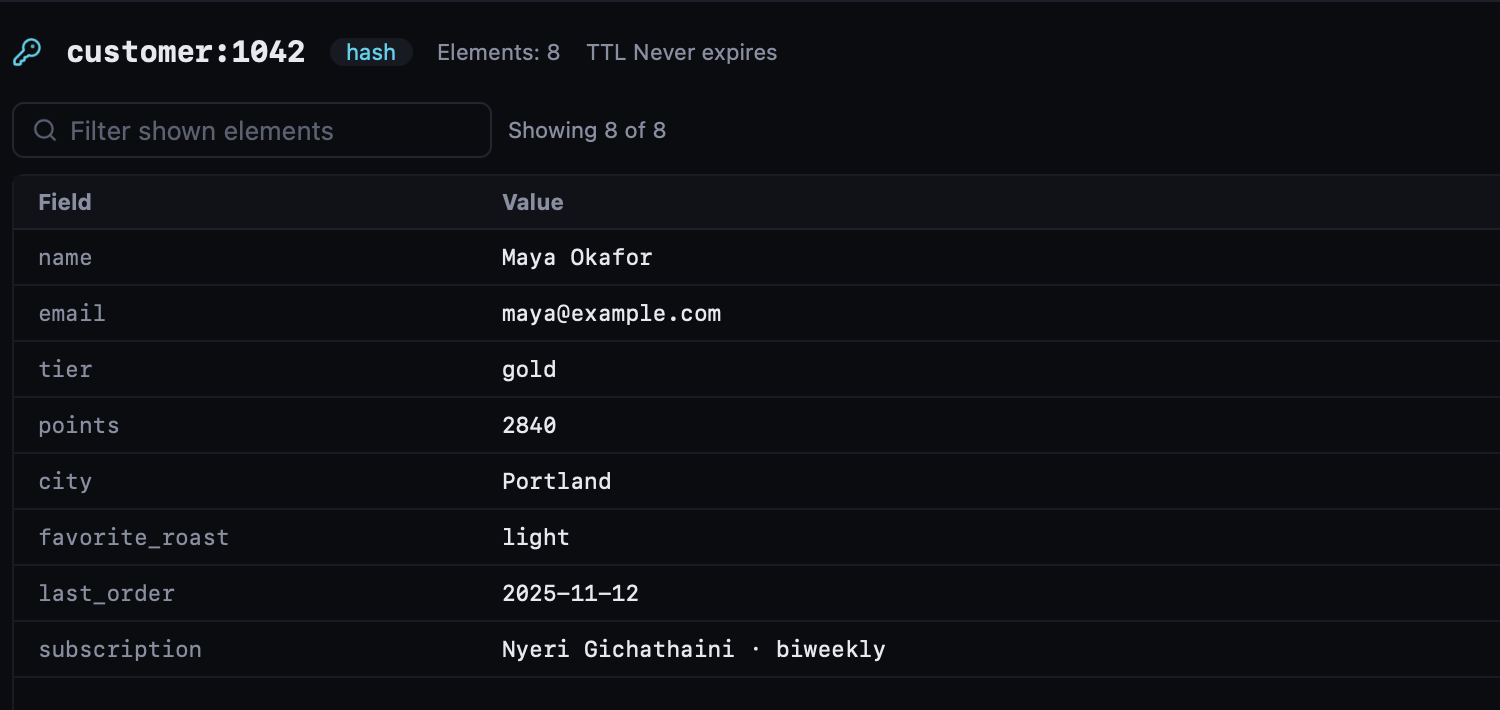
RedisMore than GET and SET不止 GET 与 SET
Edit hashes, lists, sets, sorted sets and streams as tables. Values are recognized as JSON, MessagePack, gzip, Java serialization or Protobuf. Watch Pub/Sub and MONITOR live, run Lua with KEYS and ARGV forms, and analyze memory across every node of a cluster.
Hash、List、Set、ZSet、Stream 都能像表格一样编辑。值会被自动识别为 JSON、MessagePack、gzip、Java 序列化或 Protobuf。实时查看 Pub/Sub 与 MONITOR,用表单填 KEYS、ARGV 执行 Lua,集群下逐个节点分析内存。
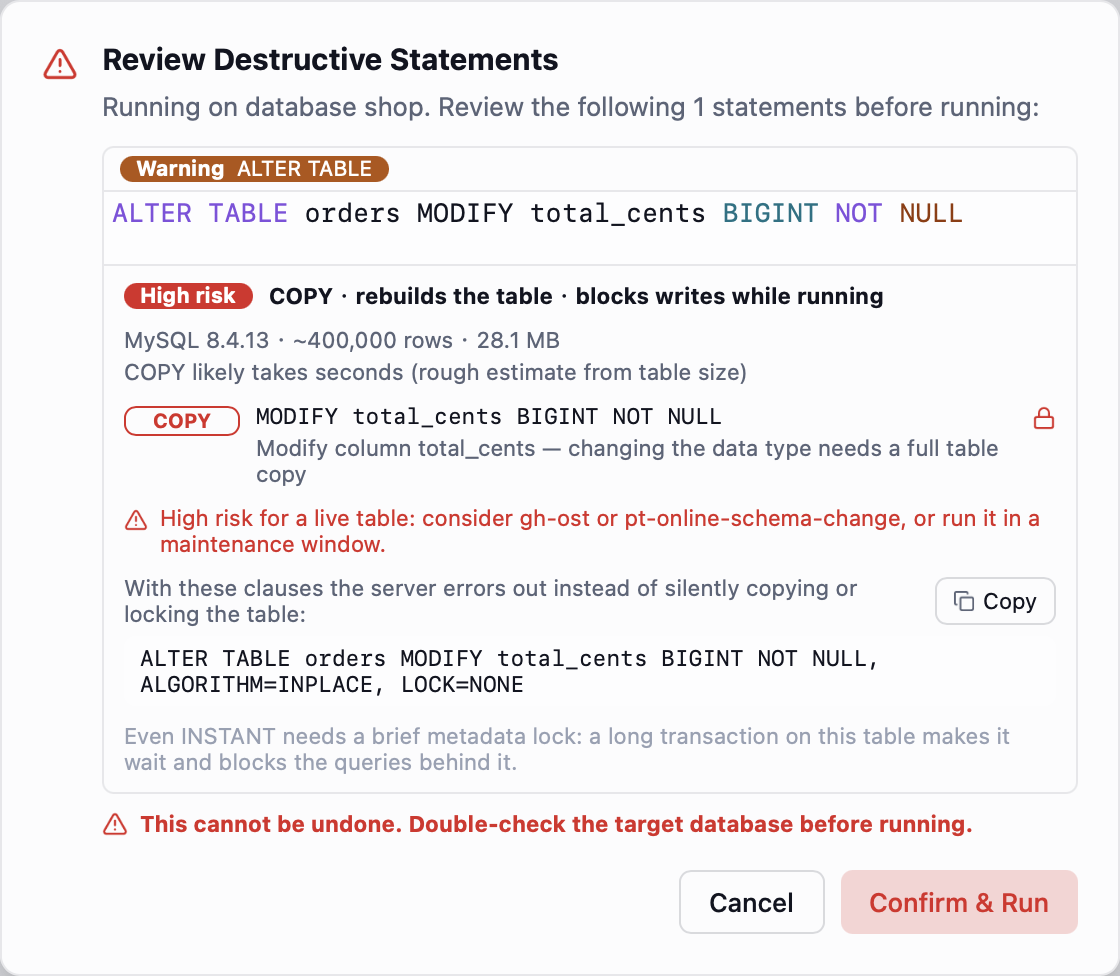
MySQLALTER TABLE without surprises改表前先知道代价
Before an ALTER TABLE runs, Datum tells you whether it is INSTANT, INPLACE or a full copy, whether it blocks writes, and roughly how long it takes on this table, and suggests gh‑ost when it's risky. A character-set check finds utf8mb3 columns and mismatched collations that quietly disable indexes.
执行 ALTER TABLE 之前,先告诉你它是 INSTANT、INPLACE 还是整表复制,会不会挡住写入,在这张表上大概要多久;风险高时建议改用 gh‑ost。字符集体检能找出仍是 utf8mb3 的列,以及让索引悄悄失效的排序规则不一致。
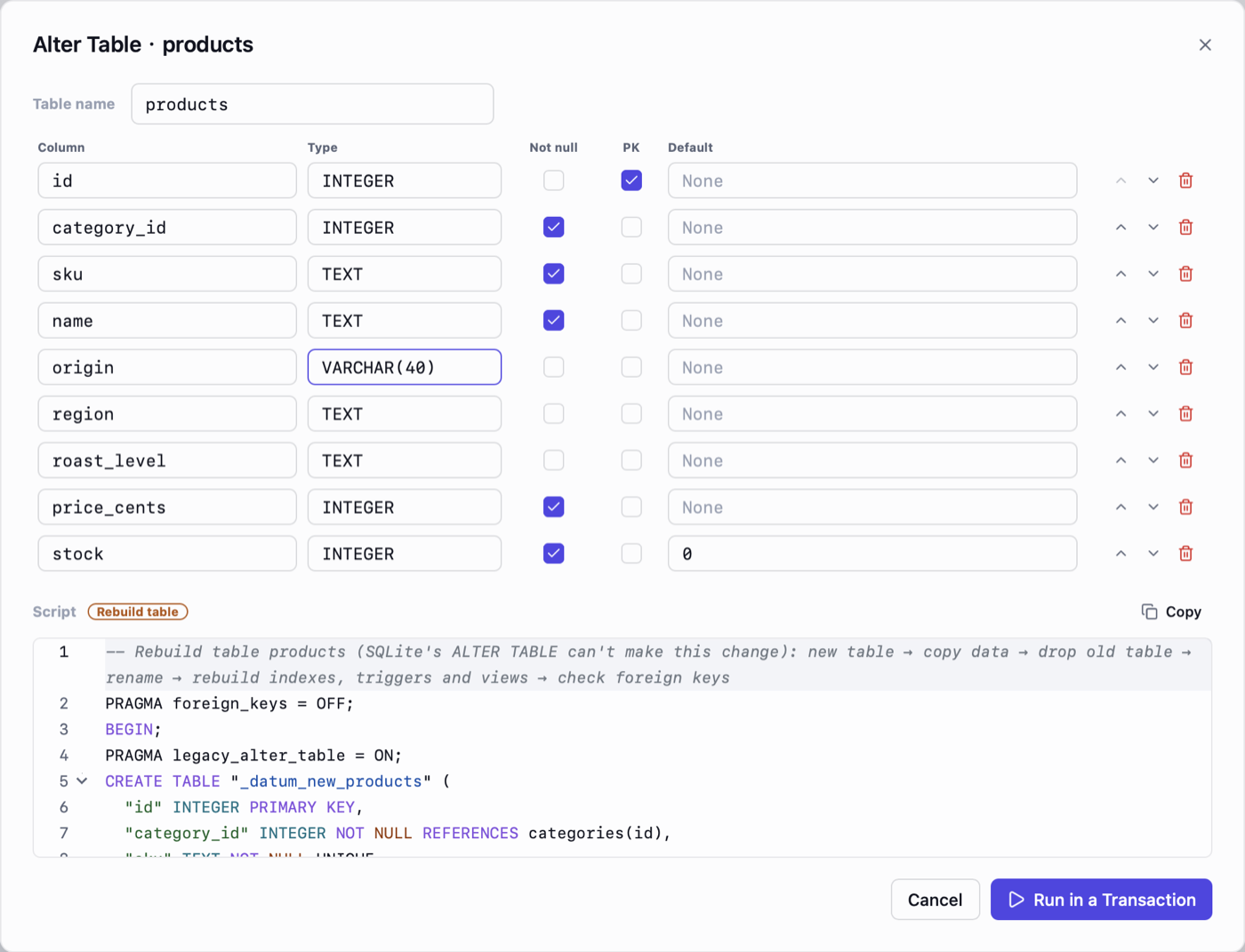
SQLiteThe ALTER TABLE SQLite doesn't have补上 SQLite 缺的改表
Change columns, primary keys and foreign keys in a form; Datum writes SQLite's twelve-step table rebuild and runs it in one transaction. Import CSV or JSON as a new table, with column types inferred and a preview first.
在表单里改列、主键和外键,Datum 按 SQLite 官方的 12 步写好重建表脚本,在一个事务里执行。CSV、JSON 可以直接导入成新表,先预览、自动推断列类型。
Everything in Datum
功能一览
Connections连接
Live connection-string preview, a database picker that lists what's on the server, SSL modes, and SSH tunnels with password, key or ssh-agent, ~/.ssh/config aliases and jump hosts. Colored by environment; staging and prod passwords go to the system keychain.
实时预览连接串,数据库可从实例上的库里选,支持各种 SSL 模式与 SSH 隧道(密码、私钥或 ssh-agent,读取 ~/.ssh/config 的别名与多级跳板)。按环境着色,staging 与 prod 的密码存进系统钥匙串。
SQL editorSQL 编辑器
Highlighting, schema-aware completion with JOIN conditions and column values, run one statement or all of them with a result tab each, :name parameters, snippets, Explain as a tree, stop a running query, per-database history. Tabs and their SQL come back after a restart.
语法高亮,懂表结构的补全,能补 JOIN 条件和列的取值;执行单条或全部,每条一个结果标签;:name 参数、SQL 片段、树形执行计划、随时停止正在执行的查询、按库隔离的历史。重启后标签与 SQL 原样恢复。
Tables表浏览
Server-side paging, sorting and filtering, values colored by type, AND / OR filters or a plain sentence, full cell view with JSON formatting. Stage edits and commit once. Export CSV, Excel, JSON, SQL or Markdown; whole tables stream straight to the file.
服务端分页、排序与筛选,按类型着色,且 / 或筛选或直接说一句话,单元格全文查看并格式化 JSON。暂存编辑后一次提交。导出 CSV、Excel、JSON、SQL、Markdown,整表导出逐行直接写入文件。
Safety安全
Destructive statements wait for review with the number of rows they touch. UPDATE and DELETE can be undone, including multi-table forms and several at once, and every write is kept in a local journal you can undo from after a restart. Read-only runs are enforced by the database itself, and your open transactions are left alone.
危险语句先审查,并显示会影响的行数。UPDATE、DELETE 执行后可撤销,多表写法、几条一起执行也行;每次写入都记进本机的写操作记录,重启后也能从记录里撤销。只读执行由数据库本身强制,你开着的事务不会被打断。
Diagnostics诊断
PostgreSQL, MySQL and SQLite: sessions, lock chains, long transactions, top SQL, unused indexes, dead rows, integrity checks. Redis: memory, big keys, prefixes, TTL and slow log.
PostgreSQL、MySQL、SQLite:会话、锁等待链、长事务、慢 SQL、未使用的索引、死行、完整性检查。Redis:内存、大 key、前缀、TTL 与慢日志。
AI
Several providers with presets, one conversation per connection, read-only lookups on its own, SQL cards you confirm, fixes for errors and readings of Explain plans. Conversations survive a restart.
多个服务商与常用预设,按连接分会话,自己做只读查询,写入以 SQL 卡片确认,能修报错、能解读执行计划。对话重启后仍在。
ER diagramsER 图
The whole database, or one table and its neighbours, with real and inferred foreign keys. Pan, zoom, drag tables, search, and double-click to open one.
整库,或某张表及其关联表,显示物理外键与按命名推断的外键。平移、缩放、拖动表、搜索,双击即可打开表。
Schema compare结构对比
Diff two databases of the same kind: tables, columns, indexes, views, triggers, foreign keys and comments, with a migration script that brings the target in line.
比较两个同类数据库的表、列、索引、视图、触发器、外键与注释,生成让目标库与源库一致的迁移脚本。
Data compare数据对比
Row-by-row diff of a table across two databases or against a backup, by primary or unique key, in chunks you can stop, with a sync script of INSERT, UPDATE and commented-out DELETE.
按主键或唯一键逐行比较两个库里的表,或与备份比较,分块读取可随时停止,生成 INSERT、UPDATE 与默认注释的 DELETE 同步脚本。
Index advisor索引建议
Candidate indexes from a slow query, verified against the plan with hypopg on PostgreSQL or a rolled-back transaction on SQLite, with cost before and after. MySQL gets rule-based suggestions.
从慢查询推出候选索引,PostgreSQL 用 hypopg、SQLite 用回滚事务对照执行计划验证,给出前后成本。MySQL 给出按规则的建议。
Test data测试数据
Realistic rows in English or Chinese that respect unique keys, foreign keys, CHECK lists and lengths, with a preview, repeatable seeds and a cancellable transaction.
生成中英文的逼真数据,遵守唯一键、外键、CHECK 清单与长度;可预览、种子可复现、插入在可取消的事务里。
Privacy数据与隐私
Sensitive columns are masked in the grid, copies, exports and AI requests; demo mode hides hosts and user names too. AI sees only the schema of prod connections unless you allow more. First SSH connections show the host fingerprint for you to confirm, and new prod connections verify the server certificate.
敏感列在表格、复制、导出和 AI 请求里自动打码,演示模式还会隐藏主机和用户名。prod 连接的数据默认不发给 AI,只给表结构。首次连接 SSH 跳板机要你确认主机指纹,新建的 prod 连接默认校验服务器证书。
English, Simplified and Traditional Chinese; light, dark or system; updates inside the app.
英文、简体中文、繁体中文;浅色、深色或跟随系统;应用内更新。
Install
安装
macOS
Datum.dmgApple silicon, macOS 14 or later. Drag Datum into Applications. Intel Mac: the x86_64 dmg on Releases.
Apple 芯片,macOS 14 及以上。打开后把 Datum 拖进「应用程序」。Intel 芯片请到 Releases 下载 x86_64 的 dmg。
Windows
Datum-setup.exeWindows 10 (1809) or later, or Windows 11.
Windows 10(1809)及以上,或 Windows 11。
Linux
linux-x86_64.tar.gzx86_64 with GTK 4.14+ and WebKitGTK 6.0. Unpack and run Datum/Datum.
x86_64,需要 GTK 4.14+ 与 WebKitGTK 6.0。解压后运行 Datum/Datum。
Datum isn't signed by Apple or Microsoft yet, so the first launch is blocked. On macOS, open System Settings › Privacy & Security and click Open Anyway. On Windows, click More info, then Run anyway. Updates install from Settings › About & Updates afterwards.
Datum 还没有苹果与微软的签名,第一次打开会被系统拦下。macOS:打开「系统设置 › 隐私与安全性」,点仍要打开。Windows:点更多信息,再点仍要运行。之后的新版本在「设置 › 关于与更新」里一键安装。